Everything in one place.
In 2–3 taps.
Route Desq keeps your clients, visits, and payments organized — right from your phone, at the side of the truck.
Setting Up Your Account
Route Desq runs in your phone's browser — no app store download needed. Add it to your home screen for one-tap access, just like a native app.
Create your account
Add it to your home screen
iPhone: Tap the Share button → scroll down → tap Add to Home Screen → tap Add.
Android: Tap the three-dot menu → tap Add to Home Screen → tap Add.
Once added, Route Desq opens full-screen with no browser chrome — just like a native app.
Pricing
| Plan | Price | Details |
|---|---|---|
| Monthly | $4.99/mo | Billed monthly. Cancel anytime. |
| Annual | $39.99/yr | Billed once a year. Best value. |
Adding Your First Client
Every client gets their own record — contact info, address, rate, visit history, and payment details all in one place. Add a new client in under a minute, right after the handshake.
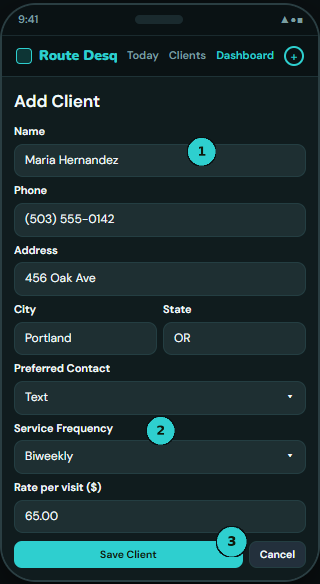
| Frequency | Meaning |
|---|---|
| Weekly | Every 7 days |
| Biweekly | Every 14 days |
| Monthly | Once a month |
| Seasonal | Variable — shows on Today when manually scheduled |
| One-off | Single job, won't recur |
Today's Job List
The Today screen is your daily dispatch. Every morning it shows exactly who you're visiting — sorted and ready to go.
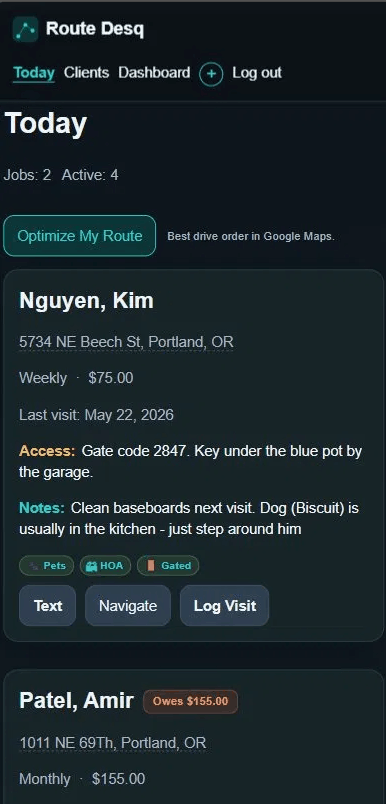
Route Desq calculates who's due today from their service frequency and last visit date. Clients on Seasonal Hold or Suspended are automatically removed from the list.
Optimize My Route
Tap Optimize My Route at the top of Today and Route Desq passes all of today's client addresses to Google Maps as a multi-stop route — automatically sorted for the shortest drive. Works with 2 stops or 20.
- Only clients due today are included — no manual filtering
- Each client card also has a Navigate button for direct one-stop navigation
- Uses Google Maps on your phone — no separate app needed
Logging a Visit
Log a visit the moment you finish the job — while you're still at the property. Under 30 seconds, keeps your records accurate.
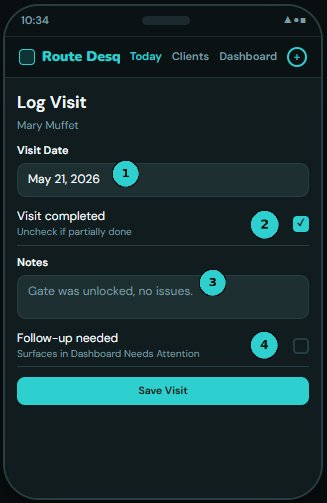
What happens after you save
- Last Visit date updates immediately on the client record
- Next Scheduled Visit is calculated and set automatically
- Payment request prompt opens — send an invoice in one more tap
- Follow-up items appear in Needs Attention on your Dashboard
Requesting Payment
Route Desq doesn't process payments — it helps you ask for them, fast. One tap sends a pre-written text with the amount and your payment handle already filled in.
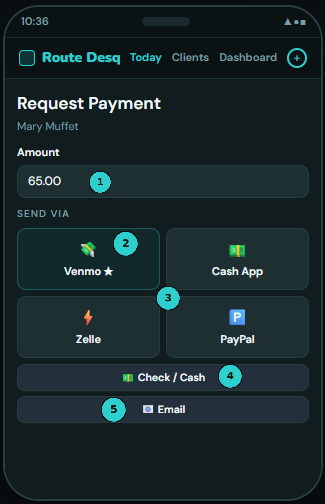
Tapping a platform button opens Messages (or mail) with the full request already written — client name, amount, your handle, your sign-off. You just hit send.
The Dashboard
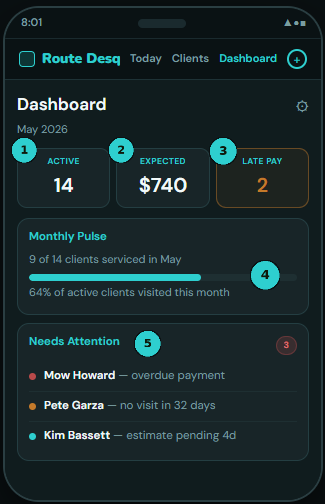
Your business at a glance — revenue, monthly pulse, expenses, and anything that needs your attention.
What surfaces in Needs Attention
- Overdue payments — past their billing cycle grace period
- Missed service — no visit logged in 30+ days
- Unresolved follow-ups flagged during a visit log
- Seasonal hold ending within 14 days
- Seasonal hold end date passed without reactivation
- Estimates pending 3+ days with no client response
Email notifications
Route Desq sends a daily email summary when things need your attention — so nothing slips even if you haven't opened the app.
Client View
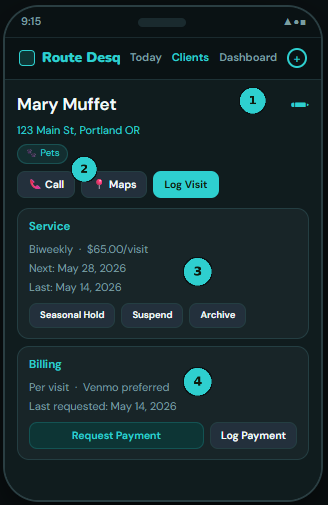
Every client has a full record — contact info, service details, billing, notes, visit history, and payment history all in one scroll.
Client Flags
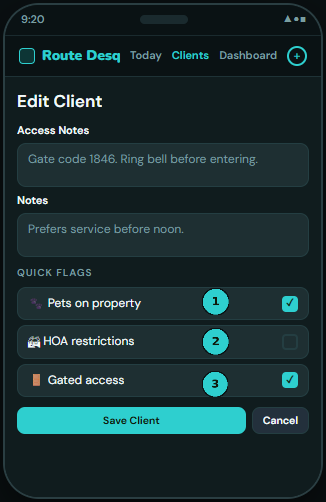
Flags are quick alerts attached to a client — visible on their Today card and client page so you're never caught off guard at the door.
| Flag | What it does |
|---|---|
| 🐾 Pets on property | Badge on Today card. Know before you open the gate — works for any pet-sensitive service. |
| 🏘 HOA restrictions | Reveals an HOA Notes field for logging rules and restrictions for that property. |
| 🚪 Gated access | Visual reminder to check access notes before arriving — gate codes, entry instructions. |
Setting flags
Seasonal Holds
Put a client on hold without losing their record. They drop off Today automatically and resurface with a Dashboard reminder before their restart date.
Putting a client on hold
What happens during a hold
- Client disappears from your Today job list
- Status shows as Seasonal Hold on the client list
- Dashboard alerts you when the resume date is within 14 days
- Dashboard also alerts if the resume date has passed without reactivation
Estimates & Quotes NEW
Send a quick estimate via text before the job starts. The client accepts or declines — you see the status on their record. No chasing, no guessing.
Sending an estimate
Status tracking
| Status | Meaning |
|---|---|
| Pending | Sent but no response yet — shown in yellow. |
| Accepted | Client said yes — shown in green. |
| Declined | Client said no — shown in red. |
Estimates pending for 3+ days with no response automatically surface in Needs Attention on your Dashboard.
Importing Clients from CSV NEW
Already have clients in a spreadsheet? Upload them all at once. Name and address are required — everything else is optional.
How to import
Supported columns
| Column | Required? | Notes |
|---|---|---|
| name | Yes | Client full name |
| address | Yes | Street address |
| city | No | |
| state | No | 2-letter abbreviation |
| phone | No | Any format |
| No | ||
| rate | No | Number only (e.g. 75) |
| frequency | No | weekly / biweekly / monthly / seasonal / one_off |
| notes | No | Access notes, gate codes, etc. |
| next_visit | No | YYYY-MM-DD or MM/DD/YYYY |
Duplicate detection: if a client with the same name and address already exists, that row is skipped. The rest still import.
Expense Tracking NEW
Log business expenses right from the Dashboard — gas, supplies, equipment, anything you spend on the job. Optionally assign to a specific client.
Logging an expense
Monthly total updates automatically. All expenses visible in the This Month's Expenses card on your Dashboard.
Settings & Payment Handles
Settings is where you set up your profile and payment handles. Access it from the ⚙ gear icon on your Dashboard.
Your name
Enter your display name — it appears at the end of every payment request. "Thanks! — Mike" is more personal than a blank sign-off.
Payment handles
Add your handles for any platforms you use. Only the ones you fill in appear as options when sending a payment request.
| Platform | Format |
|---|---|
| Venmo | @YourHandle |
| Cash App | $YourCashtag |
| Zelle | Your phone number or email |
| PayPal.Me | Your PayPal username |
Custom message templates
Personalize the text your clients receive using placeholders that fill in automatically at send time:
| Placeholder | Replaced with |
|---|---|
| {client} | Client's name |
| {amount} | Dollar amount |
| {handle} | Your payment handle for the selected platform |
| {name} | Your display name |
| {month} | Month name (summary billing mode only) |
| {visits} | List of visit dates (summary billing mode only) |
Leave template fields blank to use the app's built-in defaults. Reset back with the Reset link.
Language
Switch the entire app to Spanish in one tap — every button, every label, every screen. Switch back to English just as easily. Your preference is saved to your account.